AidConnect
Overview
AidLux is a hybrid system integrating Android and Linux, equipped with capabilities such as streaming media processing and AI inference acceleration. With the iterative development of the product, some customers need to use AidLux as a service carrier to deliver AidLux-processed data to third-party (customer-owned) applications. At the same time, the data source processed by AidLux may also come from third-party applications. AidConnect was developed to address this need.
AidConnect is built on AidIPC and supports high-speed data transmission of custom sizes between AidLux and third-party applications. Developers can add communication channel names and sizes either through manual configuration or SDK interfaces. After configuration, the communication channels can be accessed in Android or Linux environments for data reading and writing.
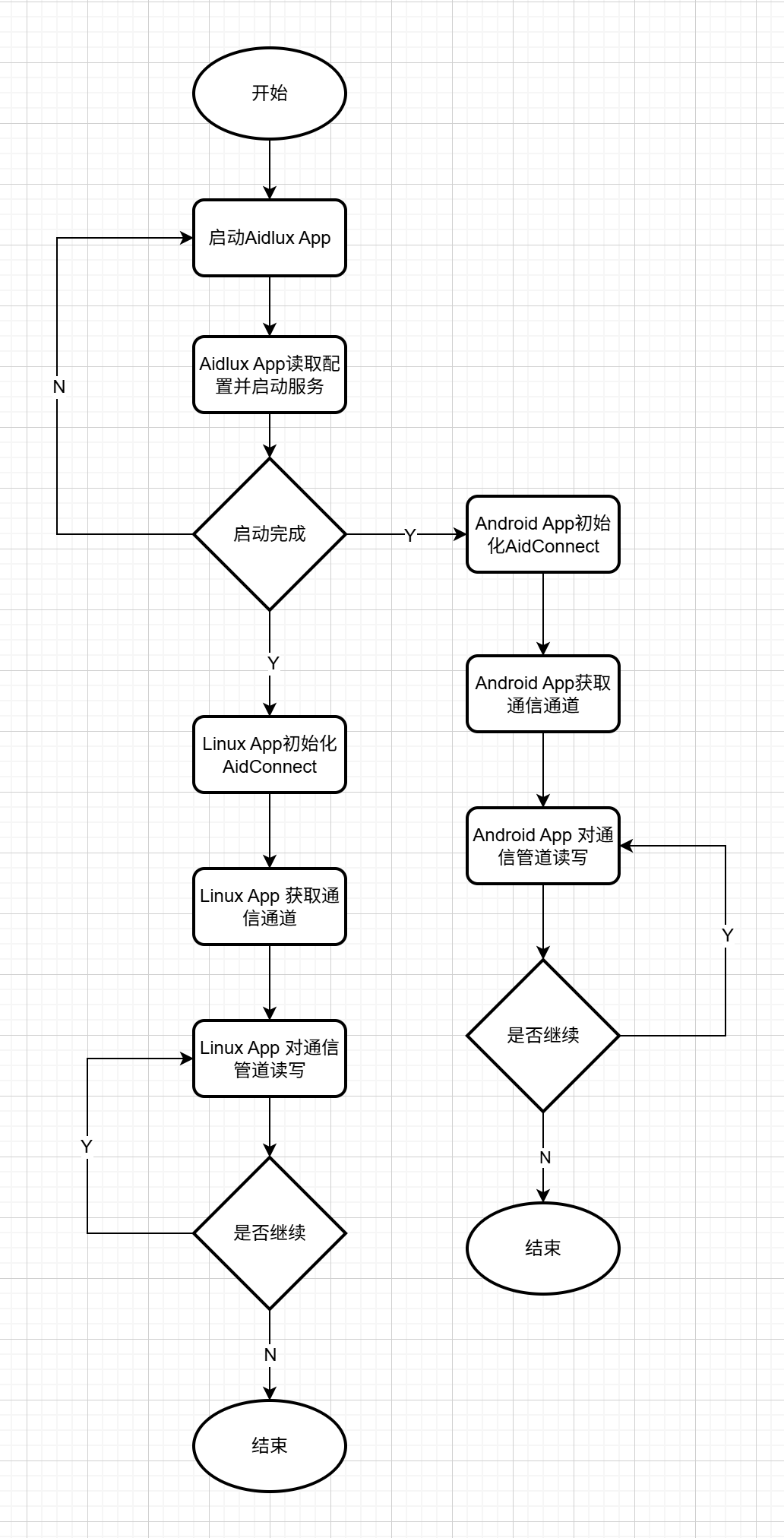
Taking a third-party application calling AidLux's AI inference capability as an example, the complete workflow is: the user configures the communication channel name and size in the AidLux App, or adds them via the Android SDK interface. If configured manually, restart the AidLux App for the channels to take effect; channels added via the SDK take effect immediately without restart. The Android App obtains the configured channel and writes source data to it. The Linux side of AidLux App reads data from the corresponding channel, performs AI operations, and writes the AI-processed results to another configured channel. The Android App then reads the AI result data from the other channel and executes subsequent application logic.
Development Process
Support Status
| Linux | Android | |
|---|---|---|
| C++ | ✅ | / |
| Python | 🚧 | / |
| Kotlin/Java | / | ✅ |
✅: Supported 🚧: Planned to be supported
Quick Start
Installation
 sudo aid-pkg update

 ## Ubuntu 20.04
 sudo aid-pkg -i -d  aidconnect_1.0.0.2_arm64_ub2004.aid.gpg
 ## Ubuntu 22.04
sudo aid-pkg -i -d aidconnect_1.0.0.2_arm64_ub2204.aid.gpg Contact AidLux to obtain the AidConnect Android SDK and integrate it into your Android projectAPI Documentation
Examples
💡Note
The following examples demonstrate how AidConnect enables data transmission between Linux and Android. Transmission channels must be pre-defined either through manual configuration or via the AidConnect Android SDK interface (choose one of the two methods). The channel configuration is stored at /etc/opt/aidlux/memory_config in the AidLux App. If configuring channels manually, follow these rules:
- Open the memory_config file and manually add a JSON object under the
customer_block_arraynode. The JSON object contains the channel name and size. 💡Note: size is in megabytes. For example: {"cap":6,"m":3,"n":5,"size":5,"block":5,"customer_block_array":[{"name":"test","size":1}]} defines a "test" channel with a size of 1MB.
The following should be noted when developing with the AidConnect SDK for C++:
- After installing the AidConnect C++ SDK, the header file is stored at:
/usr/local/include/aidlux/aidconnect/aidconnect.hpp- After installing the AidConnect C++ SDK, the dynamic library is stored at:
/usr/local/lib/aidlux/aidconnect/libaidconnect.so- After installing the AidConnect C++ SDK, sample programs are stored at:
/usr/local/share/aidconnect/examples
// AidConnect initialization
Aidlux::AidConnect aidconnect;
int status = aidconnect.init();
if(EXIT_SUCCESS != status){
    printf("aidconnect.init failed !\n");
    return EXIT_FAILURE;
}
// Get the channel
status = aidconnect.aidconnect_with_name("test");
if(EXIT_SUCCESS != status){
    printf("aidconnect.aidconnect_with_name failed !\n");
    return EXIT_FAILURE;
}
// Write data to the channel
char aaa[] = "Hello Cpp";
printf("Set string[%s], length[%d]\n", aaa, (int)sizeof(aaa));
status = aidconnect.set_bytes(aaa, sizeof(aaa));
if(EXIT_SUCCESS != status){
    printf("aidconnect.set_bytes failed !\n");
    return EXIT_FAILURE;
}
// Read data from the channel
char* result = new char[10000];
uint64_t length = 0;
status = aidconnect.get_bytes(&result, &length);
if(EXIT_SUCCESS != status){
    printf("aidconnect.get_bytes failed !\n");
    return EXIT_FAILURE;
}

printf("Result string[%s], length[%ld]\n", result, length);// AidConnect initialization
AidConnect.initialize(application, true, new AidConnectCallback() {
@Override
public void initCallback(boolean isInitSuccess, Set<String> keys) {
if (isInitSuccess) {
} else {
}
}
});
// Add a channel named "test" with a size of 1MB
Set<String> channels = AidConnect.addChannelWithName("test", 1);
if (!channels.contains("test")) {
Log.e("Activity", "addChannelWithName failed");
}
// Remove the channel
Set<String> remainingChannels = AidConnect.removeChannelWithName("test");
if (remainingChannels.contains("test")) {
Log.e("Activity", "removeChannelWithName failed");
}
// Get the channel
AidConnect aidConn = AidConnect.aidConnectWithName("test");
if (aidConn == null) {
Log.e("Activity", "aidConnectWithName failed");
} else {
}
// Write data to the channel
byte[] buffer = new byte[3840*2160*3];
boolean setFlag = aidConn.setBytes(buffer);
if (setFlag == true) {
Log.i("Activity", "setBytes successfully");
} else {
Log.e("Activity", "setBytes failed");
}
// Read data from the channel
byte[] buffer = new byte[3840*2160*3];
byte[] bytes = aidConn.getBytes(buffer, 3840*2160*3);
if (bytes == null) {
Log.e("Activity", "getBytes failed");
} else {
}
// Release AidConnect resources
int ret = AidConnect.release();
if (ret == 0) {
Log.i("Activity", "release successfully");
} else {
Log.e("Activity", "release failed");
}